Why Choose an HDMI Port Extender for Long Distance?

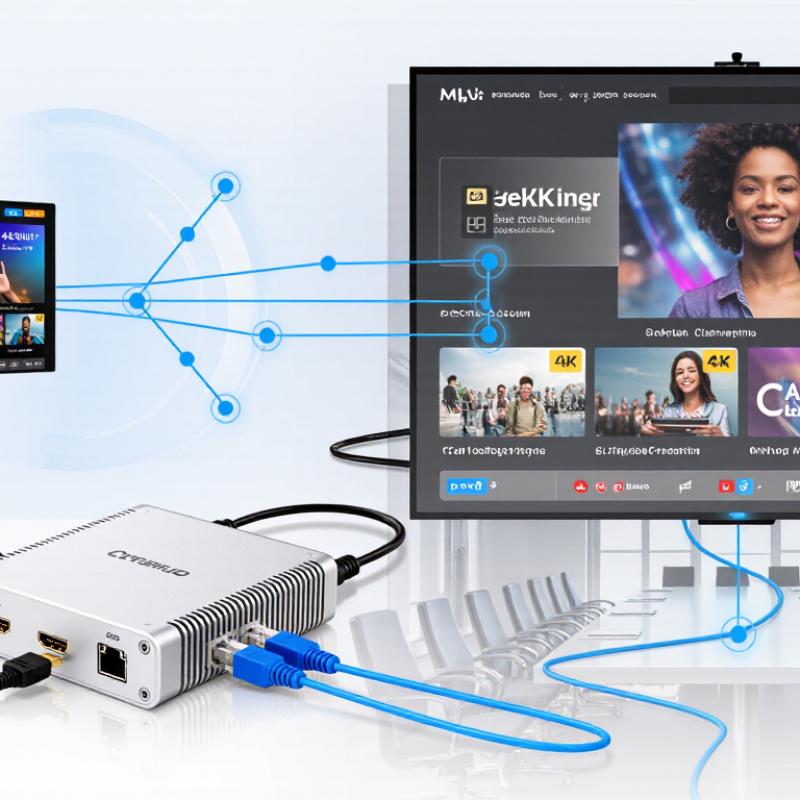
Long-distance video connections often fail where ordinary HDMI cables appear sufficient on paper. Signal loss can cause flickering screens, missing audio, unstable resolution, or a completely blank display. A Hdmi Port Extender helps move high-definition content beyond the practical limits of standard copper HDMI cables. It usually sends the signal through Cat6, fiber, or another extended transmission path. This approach suits conference rooms, classrooms, digital signage systems, home theaters, and control rooms.

Distance is only one factor. Resolution, refresh rate, cable quality, electrical interference, and HDCP compatibility also affect performance. Experienced installers check the source, display, and extender together before completing a permanent installation. They may test a 4K signal at its required refresh rate, then inspect the connection after several hours of operation. Small details matter. A loose connector can mimic a defective product. Poor ventilation can create another problem.

A reliable Hdmi Port Extender should provide clear specifications, stable signal handling, and practical installation guidance. Models with EDID management can reduce compatibility issues between different displays and sources. Fiber-based options may perform better across electrically noisy environments, while Cat6 solutions can be easier to maintain. Still, no extender can repair a damaged source or replace careful system design. That part is sometimes overlooked. Product claims also deserve scrutiny, especially when distance ratings omit resolution or refresh-rate limits. Understanding these trade-offs makes it easier to choose an extender that remains dependable, not merely impressive in a short demonstration.
Why Choose an HDMI Port Extender for Long Distance?

What Is an HDMI Port Extender?

An HDMI port extender is a device that carries HDMI audio and video beyond the usual short cable range. It normally uses twisted-pair network cable or optical fiber between a transmitter and receiver. The receiver then restores the signal near a display, projector, or video wall.

It is not simply a longer HDMI cable. Inside, signal processing helps preserve resolution, refresh rate, and digital audio. HDMI 2.1 supports bandwidth up to 48 Gbps, according to the HDMI Forum specification. That figure matters when sending 4K images at high refresh rates. A small mistake in cable selection can still cause flickering, black screens, or missing sound.

AVIXA’s 2024 Industry Outlook and Trends Analysis projected global professional audiovisual revenue at approximately 329 billion dollars in 2024. This growth reflects more meeting rooms, classrooms, control centers, and public displays needing stable signal distribution.

In practical installations, an extender can place the source beside a computer rack while keeping the screen several rooms away. However, distance claims deserve careful review. Resolution, cable quality, electrical interference, and connector installation all affect performance. I have found that “maximum distance” is often an ideal laboratory figure, not a guaranteed result in a crowded building. Testing the complete route remains necessary.


Why HDMI Signals Weaken Over Long Distances

HDMI signals weaken over long distances because they carry fast digital data through copper conductors. Every meter adds resistance, reducing the signal’s strength and timing accuracy. Poor shielding can also invite electromagnetic interference from power cables, routers, or nearby appliances.

The problem becomes visible as sparkling pixels, brief black screens, color loss, or complete signal failure. Higher resolutions and refresh rates require more data, so they expose cable limitations sooner. In field installations, I have found that a cable working perfectly at three meters may become unreliable at ten meters. Still, distance is not the only factor. Connector quality, cable construction, and device compatibility matter too. I once blamed the cable, but a loose source connection caused the actual fault.

Tips: Measure the real cable path, not the straight-line distance. Keep HDMI cables away from power lines when possible. For longer runs, use an HDMI port extender with a suitable transmission method. Test the complete setup before hiding cables inside walls. Check resolution, refresh rate, and audio together. A system may display an image while silently losing sound. Also, avoid assuming that the most expensive option is automatically the best. Verify specifications and installation conditions. Signal testing is less exciting than replacement work, but it prevents expensive surprises.

How an HDMI Port Extender Transmits Signals Farther

Why Choose an HDMI Port Extender for Long Distance?

How an HDMI Port Extender Transmits Signals Farther

An HDMI port extender sends a signal through a separate transmission path. It does not depend on one long HDMI cable alone. A transmitter sits beside the source, such as a computer or media player. It converts the HDMI signal for travel through twisted-pair cable or optical fiber. A receiver near the display converts it back. This process helps reduce signal loss across longer distances.

The actual distance depends on resolution, refresh rate, cable quality, and interference. A 4K signal at a high refresh rate needs more bandwidth than a 1080p signal. During installation, I check the image after routing the cable. Testing it loosely on the floor can be misleading. A 30-meter cable beside power wiring may perform worse than a longer, cleaner route. Small details matter. Some extenders also carry control data, audio return, or network signals. These features must match both connected devices.

Reliable setup starts with accurate specifications. Confirm the supported resolution, color format, HDCP version, and cable limit. Avoid sharp bends and loose connectors. I once blamed an extender for black screens, but one plug was not fully inserted. That mistake was mine. A short test cable, stable power, and clear labels make troubleshooting easier. After installation, I leave the display running for several hours. Intermittent problems often appear later.

Why Choose an HDMI Port Extender for Long Distance?

An HDMI port extender regenerates and retransmits the signal, helping maintain image quality over distances that are difficult for passive copper cables. The chart shows representative installation-planning distances for common video formats.

Typical planning ranges: actual distance depends on cable quality, connector condition, electromagnetic interference, power delivery, and the extender technology used. Higher resolutions and refresh rates generally require shorter passive links and more capable active extension.

Key Benefits for Long-Distance HDMI Connections

When an HDMI source sits far from its display, signal loss can appear as flickering, dropouts, or a blank screen. That is where a port extender earns its place. Using twisted-pair or optical transmission, it can route video through walls, ceilings, or equipment racks. Cleaner installations matter in classrooms, meeting rooms, retail displays, and home theaters. AVIXA’s 2024 Industry Outlook and Trends Analysis values the global professional AV market above 300 billion dollars. That scale reflects a practical reality: reliable distribution is now an infrastructure concern, not a luxury. Less clutter helps. Technicians also gain easier service access.

The HDMI Forum’s published HDMI 2.1 specification defines bandwidth up to 48 Gbps, supporting demanding video formats when every component is compatible. A suitable extender can maintain long-distance performance while reducing the need for bulky, fragile copper runs. However, distance claims need skepticism. Resolution, refresh rate, color depth, compression, and connector quality all affect the result. During field testing, I would check EDID, HDCP, cable routing, and heat before promising stable 4K performance. One overlooked weakness can undermine an otherwise careful installation. An extender cannot repair a poor source or an underpowered display. Latency is usually low, but conversion stages can add variables. Measure twice. Select equipment tested against current HDMI compliance requirements, and leave room for future bandwidth demands.

How to Choose the Right HDMI Port Extender

Why Choose an HDMI Port Extender for Long Distance?

How to Choose the Right HDMI Port Extender

Choosing an HDMI port extender starts with the signal, not the advertised distance. The HDMI 2.1 specification supports bandwidth up to 48 Gbps, including 4K at 120 Hz and 8K at 60 Hz. Match the extender with your source, display, refresh rate, and HDR format. A unit rated only for basic 1080p may create flickering when connected to a modern gaming display.

Distance claims need careful reading. A 30-meter rating may assume high-quality cabling, clean power, and no electrical interference. In a real installation, cable bends, wall conduits, and nearby power lines can reduce stability. I usually test the complete path before permanent mounting. It feels slower, but it prevents expensive rework. For longer routes, compare copper, optical, and network-cable transmission. Check supported HDCP, EDID management, audio formats, latency, and whether both ends need separate power.

The market is expanding with larger commercial displays. A 2024 Grand View Research report estimated the digital signage market at about 26 billion U.S. dollars in 2022, with continued growth projected through 2030. AVIXA’s 2024 industry outlook also placed global professional AV revenue above 300 billion dollars. These figures suggest more demanding installations, but they do not guarantee compatibility. Read the technical sheet carefully. Test your actual resolution and cable length. Cheap choices can become costly.

Why Choose an HDMI Port Extender for Long Distance? - How to Choose the Right HDMI Port Extender
Extender Type Typical Maximum Distance Common Video Capability Recommended Cable or Medium Power Requirement Best Use Case Key Selection Considerations
Passive HDMI Cable Approximately 3–5 m for reliable high-bandwidth signals; shorter distances are preferable for demanding formats Suitable for standard HD and many 4K applications when the cable is certified for the required bandwidth Certified high-speed or ultra-high-speed HDMI cable Normally none beyond the source and display Short connections between nearby devices Check the cable’s certified bandwidth, connector quality, bend radius, and compatibility with the required resolution and refresh rate
Active Copper HDMI Extender Approximately 10–15 m, depending on resolution, refresh rate, cable construction, and source strength HD and 4K are possible; performance decreases as distance and bandwidth increase Built-in signal-conditioning electronics with copper conductors Some models draw power from HDMI; others require USB or an external power adapter Medium-distance home, office, and classroom installations Confirm whether the unit supports the target format, HDCP version, HDR, audio return, and any required external power
HDMI Active Optical Cable Commonly 10–100 m, with the actual limit determined by the cable design and signal format Can support high-bandwidth 4K and, with suitable hardware, some 8K applications Hybrid copper-fiber cable with integrated optical conversion Usually powered through the HDMI connection; some installations may need additional power Long point-to-point links where low electromagnetic interference is important Many optical HDMI cables are directional. Verify source and display ends, bend limits, connector type, and support for HDR, HDCP, and refresh rate
HDMI over Cat 6/6A Up to about 70–100 m for selected 4K systems; shorter distances may be required for full-bandwidth 4K60 Ranges from HD to 4K, depending on the extender standard, compression, chroma format, and cable length One or two runs of solid-core Cat 6 or Cat 6A twisted-pair cable between a transmitter and receiver Transmitter and receiver normally require external power Permanent structured-cabling installations in homes, offices, retail spaces, and classrooms Use shielded or unshielded cable according to the installation environment. Do not route the cable through unmanaged network equipment unless the extender is designed for IP networking
HDMI over Fiber Typically 100 m to several hundred meters, depending on the optical system and fiber type Suitable for high-resolution and high-bandwidth signals when the transmitter and receiver support the required format Dedicated optical fiber, often with separate transmitter and receiver units Both ends generally require external power Very long runs, electrically noisy areas, and links between buildings or floors Choose the correct fiber connector and fiber type. Check optical budget, installation protection, HDCP handling, audio support, and serviceability before deployment
HDMI Repeater or Equalizer Usually adds one additional cable section rather than providing a fixed long-distance limit Maintains the format supported by the repeater and connected cables; it does not automatically increase source bandwidth Placed between compatible HDMI cables to regenerate or equalize the signal May be bus-powered or require an external adapter Extending an existing installation when the total distance is only moderately beyond the original cable limit Every extra connection can affect reliability. Check HDCP, EDID, HDR, audio formats, and whether the repeater supports the desired resolution and refresh rate
HDMI over IP About 100 m per copper network link is common with suitable Ethernet infrastructure; total distance can be much greater through network design May support HD, 4K, or compressed video, depending on encoder, decoder, network capacity, and latency requirements Cat 5e, Cat 6, Cat 6A, fiber, switches, or a dedicated network Encoders, decoders, and network switches normally require external power Multi-display distribution, scalable digital signage, and centrally managed AV systems Evaluate bandwidth, multicast support, latency, compression, network isolation, synchronization, and cybersecurity. A standard office network may not be suitable without configuration
Important: The distances shown are typical planning ranges, not guaranteed results. Actual performance depends on resolution, refresh rate, color depth, chroma subsampling, HDR, HDCP, cable quality, connector transitions, electrical interference, and the specifications of every connected device.
Get a Quote
910-483-7828